Helperbird for Chrome, Edge, Firefox, Safari, iPad, iPhone, Google Docs and Google Slides. Chrome
Read aloud, dyslexia-friendly fonts, Immersive Reader and reading rulers, without leaving the site you are on.
What Helperbird is
A web page is rarely built for the way you read. Helperbird changes the page you already have open, so there is nothing to copy into a separate app. Click the Helperbird icon, pick a tool, and the site in front of you changes. Links, forms and buttons carry on working.
- Finding a tool
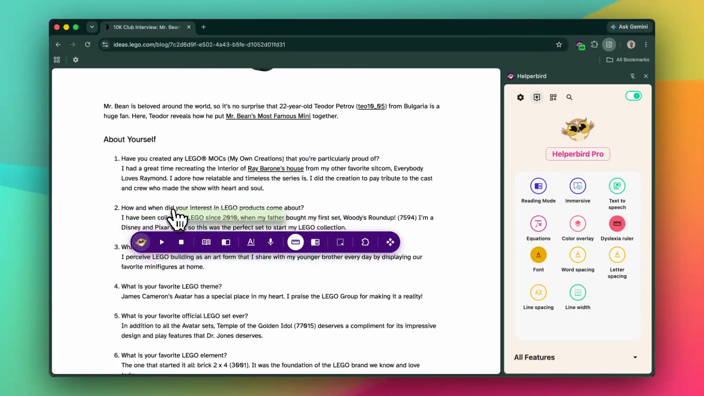
- The panel opens on the tools you have pinned. All Features opens the whole list, and Search features finds one by name. Quick actions is where you change what is pinned. How to pin a feature.
- Without opening the panel
- Right-click a page, or text you selected. The Helperbird submenu holds Play, Stop, Define, Immersive Reader and Translate. Safari, iPad and iPhone have no submenu, so use the panel there.
- Shortcuts
- Nothing is bound to a key until you turn on Shortcuts in Settings. A Mac then uses option and a key; Windows and Linux use alt, shift and a key. The full shortcut list.
What it does
More than 40 tools sit in that panel.
Read it out loud
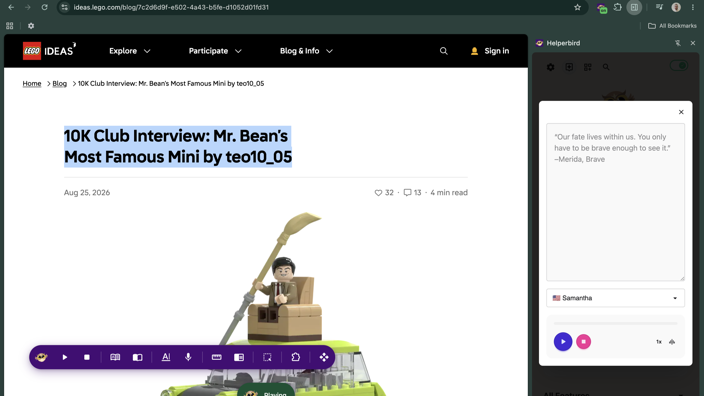
Play reads whatever you have selected. The free plan uses the voices already on your computer; Pro adds Microsoft neural voices on top when you are online. With one of your own voices, each word is highlighted as it is spoken. Reading Mode strips a cluttered page back to the article. Immersive Reader is Microsoft's reader, built in and free up to 2,000 characters at a time.
Change how the page looks
Swap the page font for OpenDyslexic, Atkinson Hyperlegible, Andika or one of six Lexend widths. The picker holds 32 fonts, or 29 on iPad and iPhone. Open up text size, word spacing, letter spacing, line height and line width.
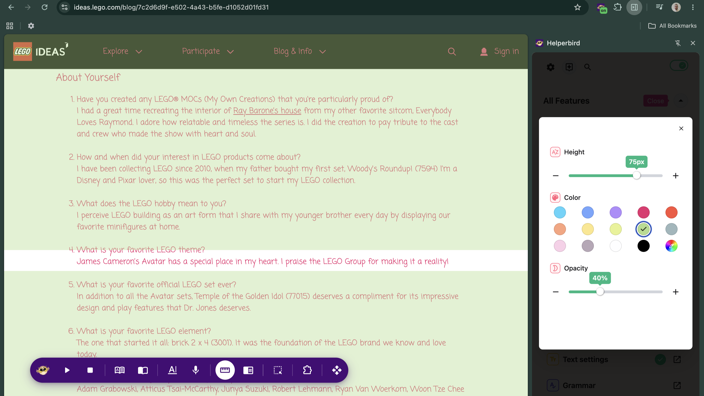
Lay a Color overlay over the page. Track the line you are on with the Dyslexia ruler, the Reading guide or the Focus ruler. High contrast has five themes and Dark Reader has four.
Write with support
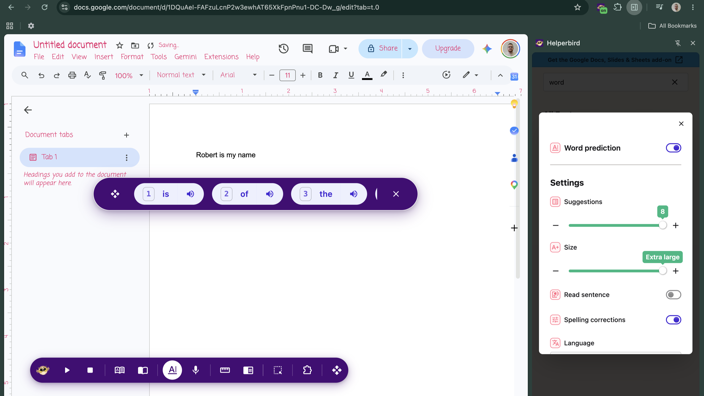
Voice typing turns what you say into text you can copy into your document. Word prediction offers the next word, and stays out of password, email and number fields and out of code editors. Grammar goes back over what you wrote. Sticky note leaves a note on the page. Spell check switches on your browser's own checker; it is not in the All Features list, so pin it to Quick actions or use its shortcut. All of these need Helperbird Pro.
Make something long shorter
Summarize turns an article into its main points. Simplify rewrites it in plainer words. Screenshot Reader pulls the text out of a picture of text, and reads equations as well as words, automatically. These three need Helperbird Pro.
Who it is for
Helperbird is built for people with dyslexia, ADHD and low vision, and for anyone who loses their place in a wall of text.
Students use it for reading and coursework. Staff use it for email and long documents. Schools and workplaces install it across a group of devices at once. An administrator can switch named tools off for everyone, or keep Helperbird off sites where it gets in the way. You get the same tools either way. There are pages for schools and universities and for larger organizations.
What is free and what needs Pro
Free, and no account
The reading and display side is free and needs no account. No email address, no sign-up form.
- Fonts and spacing
- Reading Mode
- Read aloud
- The three rulers
- Color overlay
- High contrast
- Dark Reader
- The Magnifier
Immersive Reader is free up to 2,000 characters at a time. High contrast is free to switch on; its keyboard shortcut needs Pro.
Helperbird Pro
Pro is the paid tier. It covers:
- Voice typing
- Word prediction
- Spell check
- Grammar
- Sticky note
- Summarize
- Simplify
- Equation Editor
- Screenshot Reader
- Word spotlight
- Highlights
- Dictionary lookup
- The reading list
- Microsoft neural voices
Highlighter needs Pro. The Highlight Menu it sits in is free to switch on. The pricing page lists what sits in each tier.
One subscription, every device
One Pro subscription covers every browser and device you use yourself, with no per-browser limit. It is for one person, so please do not share your subscription key. Schools and organizations use Pro Max, a site license.
Your settings follow you
Fonts, colors and reading settings travel through your browser's own sync. Open the same browser on another computer and your setup is waiting. Helperbird keeps no copy on our servers, and sync needs no Helperbird account. How settings sync.
Worth knowing
Firefox and Android. Firefox needs version 128 or later, so update yours if it is older. Firefox and Edge both take extensions on Android, so Helperbird runs on a phone as well as a laptop. Firefox on Android, Edge on Android.
Google Docs, Slides and PDFs. In a Google Doc the words are drawn as a picture, so some tools cannot reach them. The font change, Reading Mode, Immersive Reader, Summarize and Highlights do not run in a Google Doc or on a PDF. The Highlight Menu is skipped in a Google Doc, and Dark Reader does not run on a PDF. Our separate Google Docs and Slides add-on puts Helperbird in the menu bar of the document itself.
The tools you'll use most
Everything you need to Read, Write & Learn
One extension with all the accessibility and reading tools you need - built right into your browser.
Immersive Reader
Microsoft's reader on any page, with line focus, a picture dictionary and syllable breaks.
Text to Speech
Natural voices in 30+ languages, highlighting each word as it reads to you.
Screenshot Reader
Pull text out of an image or a scanned PDF. It picks up equations on its own.
Voice Typing
Speak instead of typing, anywhere you write. Word prediction finishes the rest.
Dyslexia Fonts
OpenDyslexic, Lexend, and the spacing controls that make text sit easier on the page.
Color Overlays
Tint any page and run a reading ruler down it, to take the glare off the words.
Also available on
Reviews from the Chrome Web Store, Firefox Add-ons and G2
Join over 1,000,000 people who use Helperbird every day.
I have switched from Chrome to Fi...
I have been a user of Helperbird for the past year or so and a huge fan of the work Robert has done. I have switched from Chrome to Firefox and glad this here too. 5/5. Can't wait for Voice Typing support
Robert showed great patience and ...
Excellent company and so easy to deal with. Robert showed great patience and answered every question I put. I use it for immersive reading and it is an excellent app. Well done.
she has come on leaps in school
Brilliant extension! Have tired it for my daughter and she has come on leaps in school. While there are plenty of free features, the paid ones are only 30 USD a year. Can't recommend this enough.
Questions & Answers
The questions we get asked most.
What is Helperbird?
Helperbird is a browser extension that makes reading and writing on the web easier. It adds text to speech, dyslexia-friendly fonts, color overlays, reading rulers, Immersive Reader, a PDF reader, voice typing and more to any website, PDF or Google Doc. It is built for dyslexia, ADHD, low vision, and anyone who finds the web hard to read.
Which browsers does Helperbird work on?
Helperbird works on Chrome, Firefox, Edge and Safari as a browser extension. There is also an iPad and iPhone app, and on Android it runs inside Firefox and Edge. Because it is a Chrome extension, it works on Chromebooks and ChromeOS too.
How do I install Helperbird?
Open your browser's extension store, search for Helperbird, and choose Add to Browser. The Helperbird icon then appears in your toolbar, and clicking it opens the panel. Nothing else needs setting up, and the free features work straight away without an account.
Is Helperbird free?
Yes. Helperbird has a free version that stays free, covering fonts and spacing, color overlays, dark mode, high contrast, text to speech, Immersive Reader, Reading Mode, the dyslexia ruler, reading guide, magnifier, translate, dictionary and the PDF reader. Pro adds natural voices, writing tools and the AI features.
Do I need an account to use Helperbird?
No. The free features work as soon as you install it, with no sign-up. You only log in if you buy Pro or your school gives you a license, and then you sign in with your browser's email account or enter your subscription key in Settings.

Download Helperbird
Text to speech, dyslexia fonts, reading rulers, color overlays, and 43 more.
Free to add, and the everyday tools stay free. Works in Chrome, Edge, Firefox and Safari.