
How to Use Chemistry and Physics Voice Typing in Helperbird
Learn how to dictate chemistry formulas and physics notation with Helperbird's voice typing modes. Say it out loud and Helperbird converts your speech into H₂O, SO₄²⁻, 9.8 m/s², and more.
On this page
What Are Voice Typing Modes?
Helperbird's voice typing lets you dictate text on any website, in the PDF reader, and in the Equation Editor. On top of plain dictation, voice typing has four modes that change how your speech is interpreted:
- Regular: dictate plain text, exactly as you say it.
- Math: convert spoken equations into math notation (say "x squared plus y squared" → get
x² + y²). - Chemistry: convert spoken chemistry into chemical formulas (say "H two O" → get
H₂O). - Physics: convert spoken physics into notation with units and vectors (say "nine point eight metres per second squared" → get
9.8 m/s²), plus everything Math mode does.
Only one mode is active at a time. Whichever you choose stays set until you change it, and the same setting follows you between the popup and the PDF reader.
How to Switch Modes
- Open Helperbird and start Voice Typing.
- Open the voice typing options menu beside the microphone.
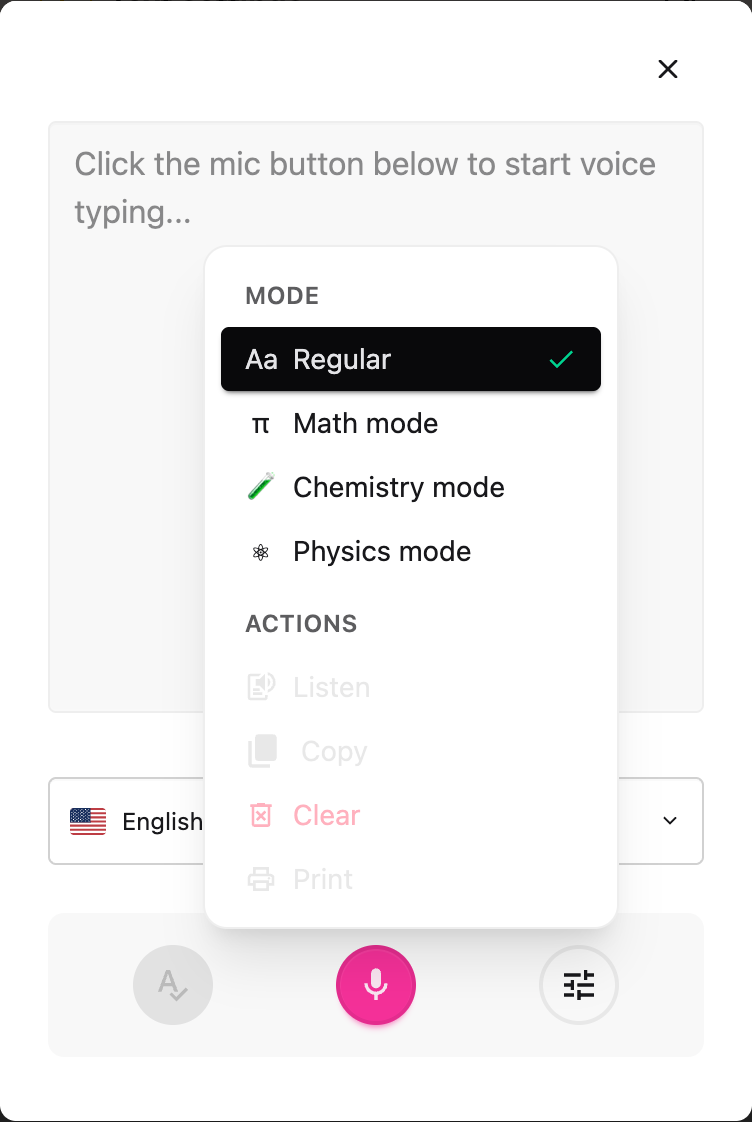
- Under Mode, choose Regular, Math, Chemistry, or Physics. A check mark shows the active mode, and a small badge appears on the microphone button so you always know how your dictation will be interpreted: π for Math, for Chemistry, for Physics.
- Press the microphone and start speaking. Your words are converted as you go.
 View full-size image (opens in a new tab)
The screenshot shows Options open in the Voice typing panel. You can choose a mode before starting the microphone.
Switching mode applies to your next dictation, so pick the mode before you start speaking.
Chemistry Mode
Chemistry mode turns spoken chemistry into properly formatted formulas and equations.
Formulas and compounds
- "H two O" →
H₂O - "carbon dioxide" →
CO₂ - "sulfuric acid" →
H₂SO₄ - "glucose" →
C₆H₁₂O₆ - "calcium hydroxide" →
Ca(OH)₂
Ions and charges
- "sulfate" →
SO₄²⁻ - "ammonium" →
NH₄⁺ - "sodium ion" →
Na⁺
Balanced equations
- "two H two plus O two yields two H two O" →
2H₂ + O₂ → 2H₂O - "N two plus three H two yields two N H three" →
N₂ + 3H₂ → 2NH₃
The number you say before an element stays full-size (it's a coefficient), while a number after an element becomes a subscript, so "two H two O" correctly gives 2H₂O.
Isotopes, hydrates, and more
- "carbon fourteen" →
¹⁴C, "uranium 235" →²³⁵U, "deuterium" →²H - "copper sulfate pentahydrate" →
CuSO₄·5H₂O - "aqueous" →
(aq), "yields" →→, "reversible reaction" →⇌
Chemistry mode also recognises all 118 elements by name, common acids and bases, polyatomic ions, organic groups, and reaction conditions.
Physics Mode
Physics mode does everything Math mode does, and adds units, vectors, and physics constants.
Units
- "ten newtons" →
10 N - "nine point eight metres per second squared" →
9.8 m/s² - "kilometres per hour" →
km/h - "fifty joules" →
50 J
Vectors and operators
- "vector F" →
F⃗ - "unit vector n" →
n̂ - "vector v cross vector B" →
v⃗ × B⃗
Constants and equations
- "speed of light" →
c - "energy equals m c squared" →
energy = m c² - "three times ten to the power of eight metres per second" →
3 × 10⁸ m/s
Because physics is mostly maths plus units, anything Math mode understands, including Greek letters, fractions, exponents and integrals, works in Physics mode too.
Math Mode
Math mode converts spoken equations into math notation without the chemistry or physics extras. For a full guide to Math mode, see How to Use Speech to Math in Helperbird.
- "x squared plus three x" →
x² + 3x - "the integral from zero to one of x squared" →
∫₀¹ x² - "square root of 72" →
√72
Tips for Best Results
- Pick the mode before you speak. Mode changes apply to the next dictation session.
- Speak naturally and clearly. Helperbird boosts recognition of science vocabulary in Chemistry and Physics modes, so terms like "sulfate" or "newtons" are heard correctly.
- Say compound names when you can. "Sulfuric acid" is more reliable than spelling out "H two S O four".
- For isotopes, say the element name and number ("carbon fourteen"), not the symbol, because that is how Helperbird knows you mean an isotope rather than an atom count.
- Switch back to Regular when you're done writing science so ordinary words aren't converted.
Where It Works
Voice typing modes are available in:
- The popup: dictate into any website.
- The PDF reader: dictate notes alongside a PDF.
- The Equation Editor: dictate equations directly into the math field.
Voice typing is a Helperbird Pro feature.
Related Guides
- How to Use Speech to Math in Helperbird
- How to Use the Equation Editor in Helperbird
- How to Use the Maths Reader in Helperbird
- How to Use Speech to Text on Any Website
Need Additional Help?
If you have any questions or run into any issues, please contact the Helperbird support team. You can reach us at Helperbird support. We are happy to help you get the most out of Helperbird.
Printed from the Helperbird Help Center · Updated September 22nd, 2026
Questions? We are happy to help — helperbird.com/support