
How to Count Words and Characters in the Helperbird Notepad
See how many words and characters you have written in the Helperbird Notepad. The Text stats window also shows sentences, reading time and speaking time.
Jump to the stepsOn this page
What Text Stats Shows You
The Helperbird Notepad counts your writing for you. Open the Text stats window and you get your word count and character count, plus twelve more figures.
Those include sentences, unique words, lines, paragraphs, and estimates of how long your text takes to read, to say out loud, and to write by hand.
The Notepad does not show a running count while you type. You open Text stats when you want the numbers.
Who is This For?
This feature is helpful for:
- Students writing essays with word count requirements
- Writers who need to track document length
- Content creators who need specific word counts
- Anyone who wants to estimate reading time
- People preparing speeches who need timing information
Step 1: Open Helperbird
Click the Helperbird icon in your browser toolbar. It looks like a small owl and is usually in the top-right corner of your browser.
This will open the Helperbird menu.
Step 2: Open the All Features Section
Scroll down to the bottom of the Helperbird menu. You will see a section called All Features.
Click the arrow next to All Features to expand it and show all available features.
Step 3: Find Notepad
Look through the list of features until you see Notepad.
Step 4: Open the Notepad
Click the button on the Notepad row to open the Helperbird text editor.
A new tab will open with the Notepad where you can write or paste your text.
Step 5: Open Text Stats
Once you have text in your Notepad, open Tools in the top toolbar, then choose Text stats.
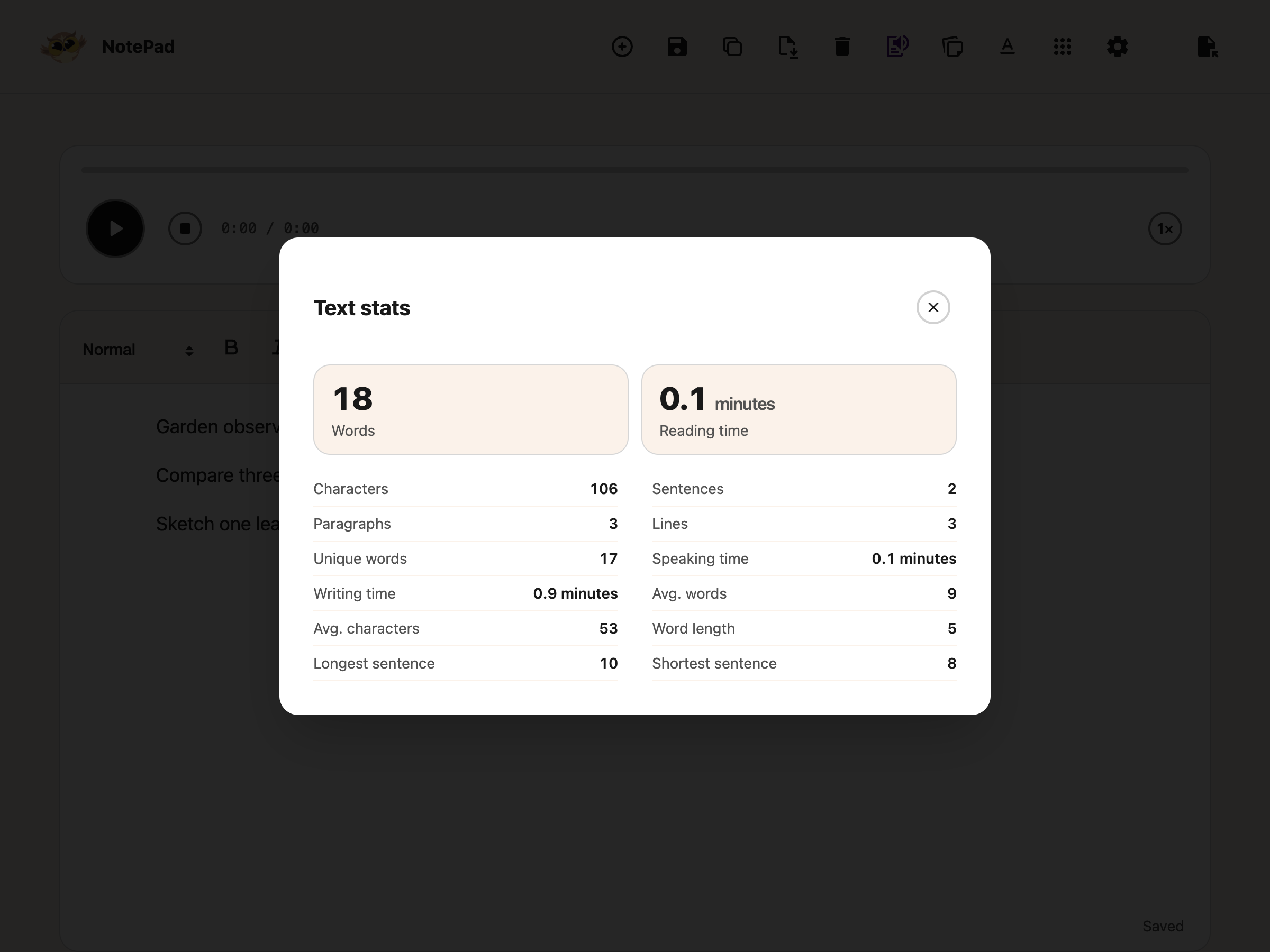
A window opens with fourteen figures about your writing.
 View full-size image (opens in a new tab)
- Words - how many words you have written
- Characters - every character, spaces included
- Sentences - how many sentences there are
- Reading time - roughly how long it would take to read, in minutes
- Speaking time - roughly how long it would take to read aloud, in minutes
- Writing time - roughly how long it would take to write out by hand, in minutes
The remaining figures show:
- Unique words - how many different words you used
- Avg. characters - the average number of characters in a sentence
- Longest sentence - the word count of your longest one
- Shortest sentence - the word count of your shortest one
- Lines - how many lines there are
- Paragraphs - how many paragraphs there are
- Avg. words - the average number of words per sentence
- Word length - the average length of a word
All three times are estimates worked out from your word count, not measurements of what you actually did. Reading assumes 250 words a minute, speaking 150, and writing by hand 20. Time estimates are shown in minutes.
Tip: Use this to check a word limit before handing something in, or to see whether your sentences are running long. A high Avg. words with a big Longest sentence usually means a sentence is worth breaking up.
Need Additional Help?
If you have any questions or run into any issues, please contact the Helperbird support team. You can reach us at Helperbird support. We are happy to help you get the most out of Helperbird.
Printed from the Helperbird Help Center · Updated September 25th, 2026
Questions? We are happy to help — helperbird.com/support