
How to Use Speech to Math (Math Mode) in Helperbird
Learn how to turn on Math Mode in Helperbird's voice typing and dictate equations out loud. Say 'x squared plus y squared' and get x² + y².
On this page6 sections
Math Mode lets you speak equations and have Helperbird write them as proper math notation. Say "x squared plus three x" and get x² + 3x, which suits anyone who finds typing maths slow or difficult.
What is Math Mode?
Math Mode is one of Helperbird's voice typing modes. With it on, your dictation is converted from spoken English into formatted mathematical notation as you talk. It covers a huge vocabulary: Greek letters, fractions, exponents, roots, integrals, derivatives, and more.
How to Turn On Math Mode
Step 1: Open Voice typing settings
Open Options in Voice typing, then choose Voice typing settings.
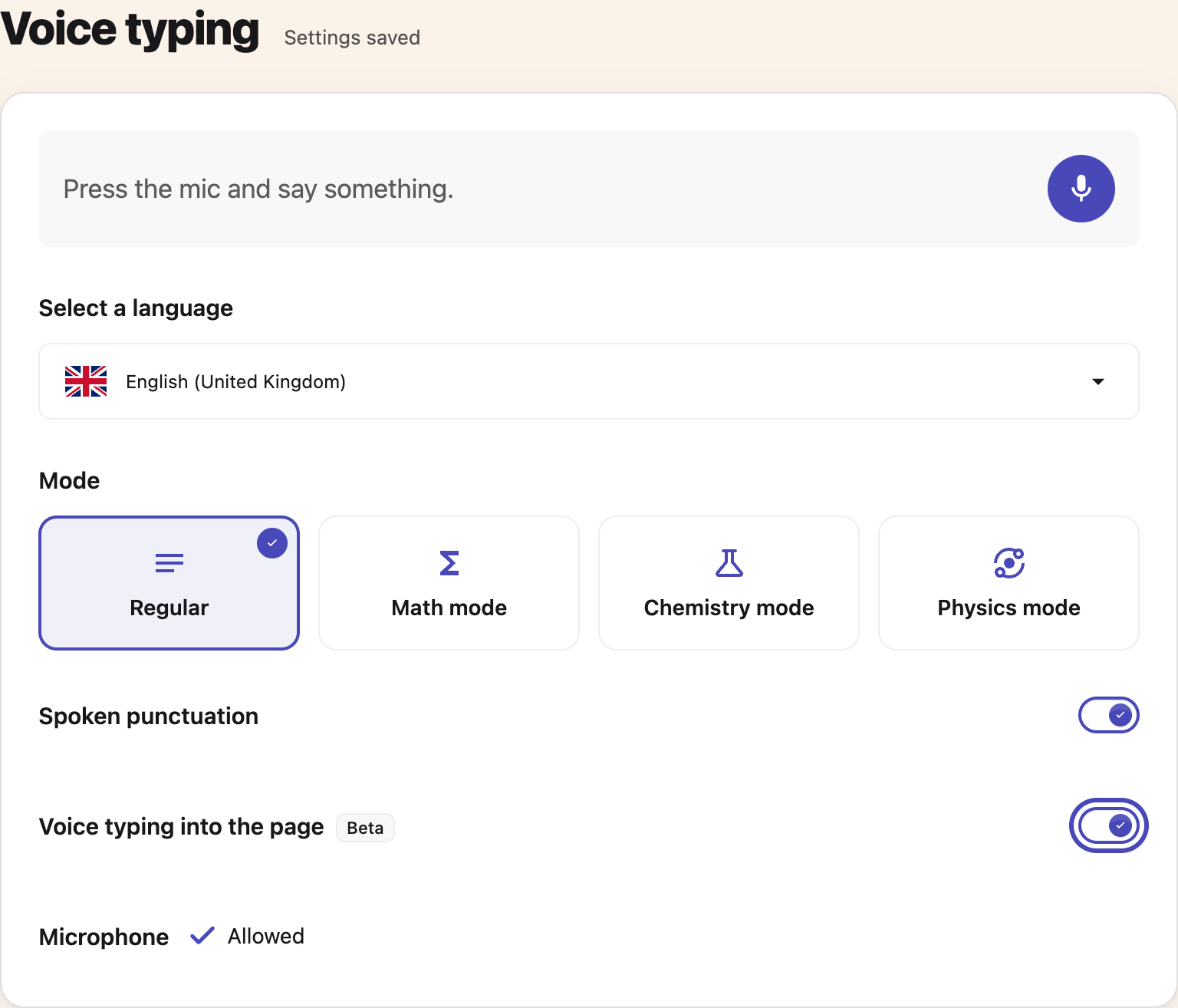
Step 2: Choose Math mode
Choose Math mode under Mode. Your choice saves automatically.
 View full-size image (opens in a new tab)
Step 3: Return to Voice typing
Return to the window where you want to dictate. Settings keeps your choice across Helperbird's voice typing tools.
Step 4: Speak
Press the microphone. Mode changes apply to your next recording.
What You Can Say
| You say | You get |
|---|---|
| "x squared plus three x" | x² + 3x |
| "square root of 72" | √72 |
| "alpha equals pi r squared" | α = πr² |
| "the integral from zero to one of x squared" | ∫₀¹ x² |
| "a over b" | a/b |
| "x is greater than or equal to y" | x ≥ y |
Tip: you can drop the word "of", so "square root seventy two" works the same as "square root of 72".
Where It Works
Math Mode is available wherever Helperbird offers voice typing:
- The popup: dictate into Helperbird's draft box, then copy the result into your work.
- The PDF reader: dictate maths into your notes.
- The Equation Editor: dictate equations straight into the math field.
For chemistry and physics dictation, switch to Chemistry or Physics mode instead. See the related guide below. Voice typing is a Helperbird Pro feature.
Related Guides
For an example of how words, symbols and grouping express an equation, read Reading and writing equations.
- How to Use Chemistry and Physics Voice Typing in Helperbird
- How to Use the Maths Reader in Helperbird
- How to Use Word Prediction in Helperbird
Need Additional Help?
If you have any questions or run into any issues, please contact the Helperbird support team. You can reach us at Helperbird support. We are happy to help you get the most out of Helperbird.
Printed from the Helperbird Help Center · Updated October 26th, 2026
Questions? We are happy to help — helperbird.com/support